Author: admin

  • Digital Transformation Consulting: Modernizing Legacy Operations Without Stopping the Business

    Digital Transformation Consulting: Modernizing Legacy Operations Without Stopping the Business

    Digital transformation consulting should help an organization improve how work gets done without putting everyday service at risk. That means modernizing in stages: retaining systems that still serve the business, addressing the workflows that create real friction, and moving capabilities only when the replacement is ready to operate reliably.

    For executives, the central question is not simply which platform to replace. It is how to reduce operational drag while maintaining throughput, accountability, and customer service. A disciplined roadmap can make modernization a sequence of controlled changes rather than a disruptive, all-at-once event.

    What should we modernize first?

    Start with evidence about how work moves through the business, not assumptions about which technology looks outdated. A legacy system may be old but stable, well understood, and fit for its current purpose. Replacing it without a clear business reason can introduce more risk than value.

    A system or process deserves closer attention when it materially constrains the organization. Look for recurring manual re-entry between tools, long queues, avoidable errors, slow reporting, fragile integrations, limited access to useful data, or a lack of support for new operating requirements. Also consider whether the system is becoming difficult to secure, maintain, or extend.

    Map a complete workflow before selecting a first project. Identify who initiates work, which systems and teams touch it, where decisions happen, and how exceptions are handled. Then establish a baseline for cycle time, manual touches, error and rework rates, throughput, and queue age. These measures reveal where technology is affecting business performance, and provide a way to judge whether a change helped.

    Choose an initial scope that matters but can be bounded. A particular intake path, a recurring reconciliation task, or a single operational handoff may offer a clearer pilot than a broad “replace the core platform” initiative.

    Operations map highlighting a high-friction workflow bottleneck and a clear path for improvement

    Why incremental modernization is often safer than a big-bang replacement

    A big-bang re-platforming moves many users, workflows, integrations, and data at once. That approach may be appropriate in some circumstances, but it concentrates risk: if a critical assumption fails, the impact can extend across daily operations.

    An incremental alternative is often called the strangler pattern. In practical terms, the organization places a controlled integration point in front of the existing system, then redirects one capability at a time to a replacement. The old system continues handling the functions that have not yet moved. As new capabilities prove themselves, the legacy footprint can shrink.

    Microsoft’s overview of the strangler fig pattern describes this kind of gradual transition. The useful principle is not that every organization needs a particular architecture. It is that modernization can be organized around clear boundaries, staged routing, and the gradual retirement of old functions.

    A practical sequence is:

    1. Select one bounded capability and define its expected operational behavior.
    2. Build the replacement and its integration path alongside the existing workflow.
    3. Validate the new path with test cases and, where appropriate, parallel comparisons.
    4. Move a limited group or portion of work to the new capability.
    5. Monitor agreed measures, expand cautiously, and retire the old function only when dependencies are understood.

    The replacement should have a defined legacy exit plan. Otherwise, incremental modernization can leave the organization with two systems to support indefinitely.

    Legacy system and modular replacement operating side by side through a controlled routing layer

    Design data and integration before building

    Custom web application development is most effective when it starts with the information and responsibilities the new system must manage, not just its screens. Before implementation, define the target data model: what key records mean, which system owns each record, how identifiers are matched, and what happens when information conflicts or is incomplete.

    Next, design the integration layer. This is the set of controlled connections and rules that let systems exchange information. It should make clear which system can create or update each type of data, how failures are surfaced, and how activity can be traced. Stable interfaces, access controls, audit logs, and monitoring are especially important when workflows involve sensitive data or multiple teams.

    This design work helps distinguish an integration problem from a platform problem. If an existing system remains useful as the authoritative source for a business record, a new application may coordinate the surrounding workflow without replacing that system. An integration layer can also make future changes more manageable by reducing direct dependencies between applications.

    For executives, the goal is a coherent operating model: reliable data movement, clear ownership, visible exceptions, and a practical path to change. The implementation may involve APIs, databases, or event-based processing, but the business case should stay grounded in workflow and accountability.

    Keep a human fallback and make cutover reversible

    Running old and new systems in parallel can reduce transition risk, but it should be deliberate. Depending on the workflow, the team might compare outputs, run the new process on a limited cohort, or keep a human review step for decisions that need judgment. Parallel operation is not automatically safe: duplicated actions or conflicting records can create their own problems, so teams must define which system is authoritative during each phase.

    A phased cutover should also have explicit rollback conditions. Before routing real work to a new capability, document who can pause the rollout, what metrics trigger that decision, how work will return to the old path, and how records created during the cutover will be reconciled. Test the fallback plan, rather than assuming it will work under pressure.

    Amazon Web Services’ guidance on replaying parallel requests offers one example of comparing how a legacy system and a new service respond to equivalent requests. The broader lesson is to validate behavior and differences deliberately before expanding the new path.

    Governance should keep the rollout connected to business priorities. Assign owners across operations, technology, security, and the teams affected by the change. Review readiness, open issues, data quality, and operational measures at each phase. That gives leaders a clear decision point: proceed, adjust, or roll back.

    Phased cutover with monitoring, parallel operation, and a reversible route to the legacy system

    How do you know transformation is working?

    A successful modernization should show improvement in the work itself, not only in the number of new tools, interfaces, or automations delivered. Compare current results with the baseline, and review trends across enough operating time to account for normal variation in volume and workload.

    Useful measures include:

    • Cycle time: How long does a request or transaction take from start to completion?
    • Manual touches: How many handoffs, re-entries, or staff interventions are required?
    • Quality: How often do errors, exceptions, or rework occur?
    • Throughput: Can the team process more work without a corresponding increase in operational strain?
    • Legacy footprint: Which functions, dependencies, or manual workarounds have actually been retired?

    Interpret these measures together. A faster workflow is not an improvement if error rates rise or employees must spend more time fixing data. Higher throughput matters if service quality and controls remain sound. Include the people doing the work in reviews; their feedback can help explain why a metric changed and where the next constraint has moved.

    When does a custom build beat another SaaS tool?

    Another SaaS product can be a good choice when its standard workflow fits the business and its integration, permissions, reporting, and governance meet operational needs. Custom software becomes worth evaluating when the work depends on distinctive rules, complex coordination across systems, specific data ownership, or a user experience that packaged tools cannot support without extensive workarounds.

    A custom application does not have to replace every existing platform. It may instead serve as an orchestration layer that brings information together, directs work, manages exceptions, and gives leaders a clearer view. PTC’s custom web development services describe the broader capability to build applications around business requirements.

    Pure Technology Consulting’s proprietary builds illustrate relevant engineering experience, rather than products offered here for sale. EHRIO Pro supports healthcare intake workflows of roughly 70 questions, provider and location matching, and HIPAA-adjacent controls. ChainHQ demonstrates multi-location operations with centralized visibility, location-aware permissions, and reporting. AI Local Boost applies governed automation to Google Business Profile workflows, while FTP Inform demonstrates a governed, auditable data exchange and validation layer. PTC has also delivered debt-collection telephony integrations with call attribution and field-rep tracking with GPS logging. Together, these examples reflect experience with complex workflows, integrations, permissions, and operational visibility.

    What do time and disruption look like?

    The scope determines both the timeline and the level of disruption. A focused pilot with a clear workflow boundary may take about 4–8 weeks to define, build, validate, and prepare for a controlled rollout. Larger initiatives involving multiple systems, business units, complex data migration, or extensive security and governance needs take longer and should be divided into separately governed phases.

    Investment should follow the same logic. A scoped custom application or automation engagement may begin in the five-figure range, while a six-figure program is more appropriate when justified by broader architecture, integrations, migration, compliance requirements, and deployment across multiple workflows or locations. These are planning ranges, not quotes; discovery is needed to define the actual scope.

    Disruption is managed through preparation: keeping functioning systems in place, limiting the first release to a clear use case, running appropriate parallel checks, training affected teams, and rehearsing rollback. The aim is not to make change invisible. It is to make each change understandable, measurable, and recoverable.

    Digital transformation consulting works best as a partnership between business and technology leaders. If legacy workflows are constraining growth, book a discovery call to discuss where a phased modernization roadmap could begin. For a staged view of the first quarter of an engagement, see our 90-day roadmap from manual workflows to an automated operating model, and learn more about Pure Technology Consulting at puretechconsult.com.

    Contact: +1 (803) 921-0969

    Amin Said, Founder of Pure Technology Consulting LLC
    https://puretechconsult.com
  • Case Study: AI Local Boost, Building a Custom Automation Platform That Scales Google Business Profile Growth Across Multi-Location Service Brands

    Case Study: AI Local Boost, Building a Custom Automation Platform That Scales Google Business Profile Growth Across Multi-Location Service Brands

    By Amin Said, Founder of Pure Technology Consulting LLC

    Multi-location growth depends on more than creating content. Each location needs accurate profile information, timely updates, appropriate review responses, and a consistent brand experience. As the location count grows, coordinating those responsibilities manually becomes an operational challenge.

    AI Local Boost is Pure Technology Consulting’s proprietary platform for governing local SEO workflows across Google Business Profile locations. We built it as a proof of concept for a broader capability: designing and delivering complex custom web applications that connect business rules, people, and external systems in a scalable operating model.

    The operational problem: local execution without shared visibility

    A service brand may have dozens of profiles managed by a mix of headquarters staff, regional managers, and local teams. Without a coordinated workflow, routine work can become fragmented:

    • Staff prepare and publish posts separately for each location.
    • Review responses vary in tone and may bypass brand review.
    • Profile details drift across locations or are difficult to verify centrally.
    • Managers lack a clear view of what is drafted, awaiting approval, or complete.

    The result is not simply more administrative work. It is reduced governance over how the brand appears locally, and limited visibility for leaders who need to understand whether core workflows are being completed.

    AI Local Boost was designed to bring those activities into a coordinated system. Rather than treating every location as an isolated account, the platform organizes work around locations, roles, approval requirements, and shared reporting.

    The constraints: scale while preserving control

    A multi-location workflow must balance local flexibility with brand consistency. A regional manager may need to review content for a group of locations, while a central administrator needs oversight across the organization. Those users should not automatically have the same access or approval authority.

    The system also operates within Google Business Profile’s authorization and API boundaries. Google’s documentation describes API access, supported methods, and quotas; applications need to account for those limits rather than assume requests can be made without constraint. For example, Google documents quota enforcement and the possibility of 429 Too Many Requests responses when limits are exceeded. Google Business Profile API limits

    These constraints informed the product design:

    • Governance: Define who can create, review, approve, and manage location-level work.
    • Brand compliance: Keep content within reviewable workflows rather than publishing every draft automatically.
    • Integration boundaries: Use supported Google Business Profile capabilities and respect authorization requirements.
    • Operational resilience: Queue and pace work so external API limits do not become a source of unpredictable failures.
    • Traceability: Record meaningful actions so teams can see what happened and who took action.

    Architecture built around locations, roles, and workflows

    The key design decision was to make the location, not a generic content item, the organizing unit of operations.

    Each location can have its own profile information, scheduled content, review-response activity, assigned users, and status history. At the same time, locations can be managed as part of broader brand or regional groupings. That structure supports centralized oversight without erasing the distinctions that matter at the local level.

    A parent brand organized into regional and individual location data layers

    The application’s core design combines several capabilities:

    • Location-aware data model: Connects each post, profile detail, review workflow, and activity record to the relevant location.
    • Roles and permissions: Allows access and responsibilities to be scoped for central teams, regional managers, and location-level users.
    • Approval queues: Makes pending decisions visible and helps teams move work through defined review stages.
    • Queue-based automation: Organizes scheduled and integration tasks so they can be processed in a controlled way.
    • Google Business Profile integration: Connects supported workflows to the external platform within its authorization and API constraints.
    • Audit logging: Captures activity to support accountability and operational review.
    • Multi-location dashboards: Gives leadership a consolidated view of work across locations, rather than requiring a location-by-location check.

    Google documents local post methods and review workflows as part of its Business Profile API resources. The application layer still needs to manage the business-specific questions around ownership, permissions, content review, scheduling, and reporting. See Google’s documentation for local posts and review data.

    Workflow design: automation with human approval

    The platform is intended to reduce repetitive coordination while keeping judgment with the people responsible for the brand. For example, a location-aware post workflow can move from content preparation to review, approval, and scheduling. A review-response workflow can similarly route a draft through an approval step before it is sent.

    A human approval checkpoint within a location-aware content workflow

    A typical workflow can follow this sequence:

    1. Prepare: A user creates content or initiates a review-response task for one or more selected locations.
    2. Validate: The system checks the relevant location, user permissions, and required workflow details.
    3. Review: Content enters an approval queue when the organization’s rules require human review.
    4. Approve or revise: An authorized user approves the item or returns it for changes.
    5. Schedule or process: Approved work is queued for execution, subject to platform availability and applicable API constraints.
    6. Record: The system logs the action and updates the item’s status for team and leadership visibility.

    This model makes automation a structured part of the operating process, not a substitute for brand judgment. Approval requirements can be especially important when local context, reputation, or regulated messaging calls for review.

    Deliverables and operational outcomes

    The platform brings together the application components needed to manage local SEO operations across multiple locations:

    • Location-level content and post scheduling
    • Review-response workflows with human approval steps
    • Listing and profile data consistency workflows
    • Location-aware permissions for franchise and regional managers
    • Centralized approval queues and activity logging
    • Dashboards for multi-location workflow reporting
    • Integration and queue controls designed around Google Business Profile boundaries

    The defensible outcome is greater operational visibility and a more governed process: teams can see where work stands, route decisions to the appropriate people, and review activity across locations. The platform’s dashboards support oversight of workflow status, approvals, profile consistency, and activity history.

    A consolidated dashboard view of approvals, location coverage, and activity

    We do not present an unverified percentage increase in rankings, engagement, or time savings as a measured AI Local Boost result. Those outcomes depend on the organization’s starting process, location count, content cadence, staffing, and market conditions.

    A useful way to establish a time baseline is to count repeatable manual tasks. For illustration, not as a measured platform result, a 20-location brand publishing two location-specific updates each week, with 10 minutes of manual preparation and scheduling per update, would spend about 400 minutes, or 6 hours and 40 minutes, on that activity weekly. A real assessment should validate the task time and include review, revisions, and exceptions before estimating any reduction. After implementation, teams can compare time logs and workflow records against that baseline.

    What this proves about custom development at PTC

    AI Local Boost demonstrates how Pure Technology Consulting approaches bespoke software: begin with the operating model, then build the data structure, permissions, integrations, automation, and reporting needed to support it.

    The same development discipline applies when a client needs a system that does not fit neatly into off-the-shelf software, whether that means coordinating multiple teams, connecting existing tools, or applying approval rules to business-critical workflows. PTC scopes custom application and automation engagements around the client’s requirements, constraints, and integration landscape, often as projects of $10,000 or more.

    For teams exploring a similar operating challenge, our custom web application development capability is a starting point for discussing architecture, integration, and delivery scope.

    Discuss your workflow and application scope

    If your organization is coordinating work across multiple locations, systems, or approval roles, a discovery conversation can help identify what should be automated, where human review belongs, and what a practical build roadmap could include.

    Book a discovery call to discuss Pure Technology Consulting’s custom web application development and automation capabilities.

    Phone: +1 (803) 921-0969
    Website: https://puretechconsult.com

    Amin Said, Founder of Pure Technology Consulting LLC
    https://puretechconsult.com

  • Case Study: How a National Debt Collection Agency Automated Account Assignment, Compliance Controls, and Recovery Reporting

    Case Study: How a National Debt Collection Agency Automated Account Assignment, Compliance Controls, and Recovery Reporting

    A national debt collection agency needs more than a database of accounts. It needs a dependable operating system for deciding which accounts are ready to work, who should handle them, what controls apply, and how activity translates into recovery performance.

    Pure Technology Consulting designed a custom web application to address those connected needs. The platform brought account assignment logic, compliance checkpoints, and operational reporting into a shared workflow, while integrating with the agency’s existing dialer, CRM, and payment systems.

    The agency’s identity and proprietary performance figures are not disclosed here. This case study focuses on the system design and operational challenges, rather than presenting unverified results. To learn more about Pure Technology Consulting, visit our website.

    The operating challenge: decisions scattered across systems

    The agency’s account data and collection activity lived across separate platforms. The CRM held account and workflow details, the dialer managed calls, and payment systems recorded financial activity. Each platform served a purpose, but the agency lacked a unified operational view.

    That separation made several important processes difficult to coordinate:

    • Assignment decisions depended on multiple factors. Account status, scoring rules, collector capacity, skills, and business priorities all shaped the next assignment.
    • Controls needed to follow the account. Disputes, holds, contact restrictions, and other status changes had to be reflected before an account was made available for collection activity.
    • Auditability required a coherent history. When a decision was questioned, teams needed to understand what information and rule led to that decision.
    • Reporting required reconciliation. Managers had limited visibility into assignment activity, payment outcomes, recovery trends, and exceptions across systems.

    The issue was not simply that staff had to perform manual steps. The agency needed a reliable way to coordinate decisions across systems without losing the context behind them.

    The design goal: coordinate work, controls, and evidence

    The custom application was designed as an operational layer connected to the agency’s existing systems. Rather than replacing every platform, it organized key account decisions and gave staff a consistent place to review assignment status, workflow conditions, and reporting.

    The project was scoped around four capabilities: a structured data model, an integration layer, a rules-driven assignment engine, and governance features that made system activity reviewable.

    Account records moving through a rules engine into balanced collector work queues

    Account data designed for decisions

    A dependable assignment process begins with consistent records. The application brought together the fields needed to evaluate and route accounts, while preserving links to the systems that originated or updated each piece of information.

    That meant defining core account attributes and relationships, including relevant account status, scoring inputs, assignment history, and references to source-system records. The data model also had to make room for changes over time: an account could move between queues, acquire a new status, or become subject to a hold.

    The aim was not to copy every field from every platform into a new database. It was to identify the information required for reliable decisions, document where it came from, and maintain a usable account history.

    An integration layer that accounts for real-world exceptions

    Connecting the CRM, dialer, and payment systems required more than moving data from one place to another. The integration layer needed to handle inconsistent timing, duplicate updates, failed messages, and changing account states.

    The application was designed to manage those realities through controlled data exchange, validation, and exception handling. When incoming information was incomplete or conflicting, the workflow could route the record for review instead of treating uncertainty as a green light for assignment.

    This distinction matters in high-volume operations. A successful integration is not only one that transfers records; it is one that helps staff recognize when records are missing, stale, or inconsistent, and provides a path to investigate.

    Assignment logic that reflects the operating model

    The assignment engine applied the agency’s defined scoring and routing rules to determine how eligible accounts should move into work queues. The rules could account for the decision factors established during discovery, such as account status, priority, collector capacity, and operational constraints.

    A central engine made assignment decisions more consistent and easier to review than a patchwork of spreadsheets or informal practices. It also provided a foundation for controlled changes: business stakeholders could evaluate how a rule update might affect routing before the change became part of daily operations.

    The system’s purpose was not to remove human judgment from every decision. It was to automate repeatable routing, surface exceptions, and make the basis of an assignment easier to understand.

    Compliance controls built into the workflow

    In a regulated operation, a control that exists only in a policy document may be difficult to apply consistently across disconnected systems. The application was designed to bring relevant status checks into the workflow so that assignment decisions could account for holds, restrictions, and other conditions maintained by the agency.

    The governance model emphasized clear event histories: what changed, when it changed, which system or user initiated the change, and what action followed. Where a status or integration response required review, the workflow could keep the account out of ordinary processing until it was resolved.

    These are technology and process controls, not a substitute for legal advice or a compliance program. Federal rules establish obligations but do not prescribe a particular software architecture. Agencies should have qualified compliance counsel assess how their policies and technology align with applicable requirements. The CFPB’s Regulation F provisions and record-retention rule are useful starting points for that review.

    Account workflow with compliance checkpoints, status controls, and a traceable event history

    Recovery reporting that connects activity to outcomes

    The reporting layer brought operational and recovery information into a more coherent view. Instead of treating assignment, collection activity, and payment records as separate reporting problems, the application connected them through account and event references.

    That gave managers a framework for examining questions such as:

    • How are eligible accounts moving through assignment queues?
    • Where are exceptions or delays accumulating?
    • How do account status and work allocation relate to payment activity?
    • Which results are visible in the source systems, and which require reconciliation?
    • Can a reported figure be traced back to the underlying account activity?

    The objective was not to claim a specific recovery increase without a verified baseline and measurement period. It was to improve the quality and traceability of the information leaders use to manage operations and evaluate performance.

    Unified analytics workspace connecting dialer, CRM, and payment activity to recovery reporting

    How this fits into a broader custom-build capability

    This engagement is distinct from file-processing and telephony attribution work. Its center of gravity is the coordination of account assignment, workflow controls, and recovery reporting.

    It also builds on capabilities developed in adjacent operational settings. PTC’s experience includes debt-agency telephony integrations that connect calls to attribution, as well as FTP Inform, which demonstrates secure file ingestion, validation, transformation, and workflow orchestration. Those systems are proof points for complex data and integration work, not substitutes for scoping the agency’s own operating model.

    A custom application can bring those capabilities together when the requirement calls for a tailored system. Learn more about PTC’s custom web application development approach.

    Typical deliverables for a scoped engagement

    The exact roadmap depends on source systems, data quality, operating policies, and stakeholder requirements. A premium custom build may include:

    • Workflow discovery and a prioritized requirements map.
    • Account and event data models with source-system traceability.
    • Integration specifications and resilient data-exchange workflows.
    • Configurable assignment rules, queue management, and exception paths.
    • Role-based access, event histories, and governance controls.
    • Operational dashboards and recovery reporting.
    • Testing, deployment planning, documentation, and post-launch support.

    These engagements are scoped around business complexity and integration requirements. Custom application projects may begin at $10,000 or more, with the final investment determined through discovery and a defined delivery plan.

    Turn fragmented operations into a coordinated system

    For a national agency, assignment, compliance controls, and recovery reporting are interdependent. Treating them as separate software problems can preserve the very silos that make operations difficult to manage. A purpose-built application creates a shared framework for routing work, handling exceptions, and understanding performance.

    To discuss an operational challenge or define the right project scope, book a no-obligation discovery call or contact Pure Technology Consulting at +1 (803) 921-0969.

    Amin Said, Founder of Pure Technology Consulting LLC
    https://puretechconsult.com

  • Enterprise Automation Consulting: A 90-Day Roadmap from Manual Workflows to an Automated Operating Model

    Enterprise Automation Consulting: A 90-Day Roadmap from Manual Workflows to an Automated Operating Model

    Enterprise automation should create operational leverage, not another layer of complexity.

    For many organizations, the challenge is not a lack of software. It is the distance between how work is supposed to move and how it actually moves. Teams re-enter information across systems, managers rely on spreadsheets for visibility, and important decisions depend on individual memory rather than governed workflows.

    A realistic engagement with an enterprise automation consulting firm does not attempt to automate the entire organization in one quarter. The first 90 days should establish a durable foundation:

    • Understand the current operating model.
    • Select one high-value workflow.
    • Design the data and integration architecture.
    • Ship a production-shaped automation.
    • Measure its impact.
    • Create the governance required to scale.

    The central principle is straightforward: automation follows the operating model. It does not define the operating model.

    That is why custom web application development often becomes important. When the workflow includes specialized rules, multiple systems, role-based decisions, exceptions, or complex reporting, a durable solution may require more than configuring an off-the-shelf platform.

    What the first 90 days should accomplish

    A successful first quarter is not measured by the number of automations launched. It is measured by whether the organization can operate one improved workflow with clearer ownership, better data, measurable performance, and a credible path to scale.

    By Day 90, the organization should have:

    • One named business owner for the pilot workflow.
    • A documented current-state and target-state process.
    • A baseline for cycle time, errors, throughput, and manual effort.
    • Defined system-of-record and data ownership decisions.
    • A tested automation operating in a controlled production environment.
    • Human approval and exception paths where judgment is required.
    • A runbook for support, monitoring, rollback, and change management.
    • A prioritized roadmap for the next three to six automation opportunities.

    This is the difference between a technology demonstration and an operating capability.

    Days 1–30: Discover the process, data, and operating constraints

    Process and data discovery for an enterprise automation roadmap

    The first month is dedicated to understanding how work moves through the organization today.

    This stage is often underestimated. Leaders may already know that a workflow is slow or inconsistent, but effective business process automation consulting requires more than identifying visible frustration. The consulting team must understand the complete process, including the steps that employees have created to compensate for limitations in existing systems.

    Map the current state

    Discovery should examine:

    • How work enters the organization.
    • Which teams own each stage.
    • Where information is created, copied, validated, and stored.
    • Which decisions are rules-based.
    • Which decisions require expertise or approval.
    • Where work waits in queues.
    • Which exceptions regularly interrupt the standard process.
    • Which systems exchange data, and which do not.
    • What security, privacy, or retention requirements apply.

    Interviews should be supported by workflow observation, document review, system logs, and process data where available. A process map should distinguish active work from waiting time, human judgment from repetitive coordination, and required controls from legacy habits.

    The goal is not to document every process in the enterprise. It is to identify the workflows most likely to produce measurable value and reusable architecture.

    Establish a baseline

    Before automation is introduced, the organization needs a point of comparison.

    Useful baseline measures may include:

    • End-to-end cycle time.
    • Active staff time per transaction.
    • Queue or waiting time.
    • Manual touches and duplicate data entry.
    • Error and rework rates.
    • Throughput by team or location.
    • Exception volume and aging.
    • Cost per completed case.
    • Customer, patient, employee, or partner response time.

    Not every process requires every metric. The important discipline is to define the measurement model before the system is changed.

    A workflow that appears inefficient may have a different root cause than expected. The delay may come from incomplete intake data, unclear ownership, inconsistent policy, or a missing integration rather than a lack of staff effort.

    Select the first automation

    Candidate workflows should be evaluated across several dimensions:

    • Business value.
    • Transaction volume.
    • Avoidable manual effort.
    • Data quality.
    • Process stability.
    • Integration complexity.
    • Compliance and operational risk.
    • Change readiness.
    • Reusability for future initiatives.

    The best first workflow is usually important enough to matter, contained enough to control, and stable enough to measure. An organization should avoid starting with a process whose ownership, policy, or source data is still unsettled.

    The first 30 days should conclude with a current-state map, data inventory, risk register, prioritized use case, target outcomes, and accountable owners.

    Days 31–60: Design the architecture and ship the first automation

    Custom web application architecture connecting enterprise systems, AI workflows, and human approval checkpoints

    The second month converts the selected workflow into a technical and operational design.

    This is where enterprise automation consulting must move beyond tool selection. The team needs to decide what should remain in existing systems, what should be orchestrated through integrations, where artificial intelligence is appropriate, and where custom web application development is justified.

    Define the target operating model

    The future-state workflow should clearly separate:

    • Deterministic automation.
    • AI-assisted activities.
    • Human approvals.
    • Escalation paths.
    • Exception handling.
    • Manual fallback procedures.
    • Reporting and performance visibility.

    For example, an AI workflow automation system may classify an inbound request, extract information from a document, recommend an assignment, or draft a response. It should not make a high-impact decision without appropriate review simply because the technology can produce an answer.

    AI is most useful where variability and unstructured information create the bottleneck. Deterministic rules remain preferable for policy-critical calculations, required validations, permissions, and control points.

    This is a core principle of responsible AI consulting services: use AI to direct human attention, not to obscure accountability.

    Design the data architecture

    The pilot should define the major entities, identifiers, statuses, relationships, and lifecycle transitions involved in the workflow.

    For each important field, the team should identify:

    • The system of record.
    • The owner of the data.
    • Who can create or modify it.
    • How quality is validated.
    • How changes are synchronized.
    • How long it should be retained.
    • How access is audited.

    Without these decisions, automation can move bad information faster while creating new versions of the truth.

    Design integration boundaries

    The architecture should document how data moves between CRM, ERP, scheduling, billing, document, communication, reporting, and operational systems.

    Where possible, durable integrations should use APIs and events rather than fragile point-to-point workarounds. Legacy systems may still require controlled adapters or interface automation, but those dependencies should be visible and bounded.

    For AI-enabled workflows, architecture should also address:

    • Model and prompt versioning.
    • Grounding sources.
    • Output validation.
    • Confidence thresholds.
    • Tool permissions.
    • Human review requirements.
    • Audit history.
    • Usage and cost controls.

    A custom application may be appropriate when the organization needs a unified intake experience, operational workbench, exception console, role-specific dashboard, or domain-specific decision interface that packaged tools cannot provide.

    The objective is not to replace every existing platform. It is to create the orchestration layer that allows those systems to work together.

    Ship a production-shaped pilot

    The first automation should be built with production requirements in mind, even if its initial scope is limited.

    Typical deliverables include:

    • Secure user access and role-based permissions.
    • Workflow states and ownership.
    • Data validation.
    • API or file-based integrations.
    • Notifications and task routing.
    • Audit logs.
    • Error handling and retry logic.
    • Monitoring and alerts.
    • Reporting dashboards.
    • Manual override and rollback procedures.
    • Staging and test environments.

    The pilot should be tested for functional behavior, integration reliability, data quality, security, usability, performance, and failure modes.

    The result should not be a prototype that works only during a demonstration. It should be a controlled first release that real users can evaluate safely.

    Days 61–90: Scale responsibly through governance and measurement

    Governed automation operating model with monitoring, KPI measurement, audit logs, and connected business teams

    The final month turns the pilot into an operating capability.

    The workflow should run with real users and a safe manual fallback. Performance should be compared against the same definitions used during discovery.

    Relevant measures may include:

    • Cycle-time change.
    • Hours of manual coordination reduced.
    • Error and rework change.
    • Throughput.
    • Exception rate.
    • SLA attainment.
    • Adoption and override rates.
    • Cost per completed transaction.
    • Data completeness.
    • Customer or employee experience.

    The organization should distinguish between theoretical time saved and realized business benefit. If a workflow saves staff time, leadership should determine whether that capacity is being redeployed, whether hiring can be deferred, or whether service quality and throughput are improving.

    Create the governance model

    A practical enterprise model often combines centralized standards with domain-level ownership.

    A central automation enablement function can own:

    • Reference architecture.
    • Approved platforms and vendors.
    • Reusable connectors and components.
    • Security patterns.
    • Automation and AI inventory.
    • Training and delivery standards.
    • Value measurement.

    Business or domain teams should own process outcomes, prioritization, user acceptance, and day-to-day decisions. IT and platform teams should own environments, identity, integration reliability, and operational support. Security, legal, privacy, and compliance teams should provide risk-based review.

    Every production workflow should have a named process owner and technical service owner.

    The organization should also maintain a registry documenting each automation or AI-enabled workflow, including its purpose, owner, systems, permissions, data categories, dependencies, current version, and next review date.

    Build the runbook and scale plan

    Before the engagement closes, the team should document how the workflow operates after handoff:

    • What normal performance looks like.
    • How alerts are handled.
    • How failed transactions are retried.
    • How records are reconciled.
    • When staff should use manual override.
    • How incidents are escalated.
    • How access is reviewed.
    • How model or workflow changes are tested.
    • How rollback is performed.

    The final deliverable should include a measured outcome report, architecture decisions, lessons learned, and a sequenced six- to twelve-month roadmap.

    Proof of capability across complex operating environments

    Pure Technology Consulting brings proven engineering patterns into new custom engagements rather than starting from a blank page.

    • EHRIO Pro demonstrates structured healthcare intake, approximately 70-question workflows, provider and location matching, scheduling logic, and HIPAA-adjacent operational controls.
    • ChainHQ demonstrates multi-location operations, centralized visibility, assignment logic, location-aware permissions, and cross-location reporting.
    • AI Local Boost demonstrates governed local SEO automation across Google Business Profile workflows, approvals, reporting, and location-level activity.
    • FTP Inform demonstrates controlled data exchange, validation, transformation, permissions, monitoring, and audit-oriented workflow management.

    These proprietary builds are proof-of-work examples, not generic products being promoted as a substitute for strategy. They show how custom applications, integrations, automation, and governance can be combined around complex business requirements.

    The same capabilities can support legal, accounting, healthcare, field operations, debt, e-commerce, and professional services organizations that need technology aligned with the way they operate.

    The outcome after 90 days

    A credible 90-day result is not “the enterprise is fully automated.”

    It is more practical and more valuable:

    One important workflow is operating under clear ownership. The organization understands its baseline and can measure improvement. Users have a safe, usable system. Exceptions and failures are visible. Security and governance controls are documented. The architecture can support the next phase. Leadership has a prioritized roadmap rather than an unstructured list of AI ideas.

    That is how digital transformation consulting becomes durable. The organization builds an operating model that can improve over time, rather than collecting disconnected automations that become another form of technical debt.

    If manual workflows, disconnected systems, or limited operational visibility are constraining growth, book a discovery call with Pure Technology Consulting to scope the opportunity. You can also explore PTC’s custom web application development capabilities and review the operating-model approach to automation.

    Contact: +1 (803) 921-0969

    Amin Said, Founder of Pure Technology Consulting LLC
    https://puretechconsult.com

  • Case Study: EHRIO Pro, Engineering a Clinical Intake and Provider-Matching Engine for Multi-Location Healthcare Groups

    Case Study: EHRIO Pro, Engineering a Clinical Intake and Provider-Matching Engine for Multi-Location Healthcare Groups

    Amin Said, Founder of Pure Technology Consulting LLC

    For a multi-location healthcare group, clinical intake is not simply a form submission. It is the first operational decision point in the patient journey.

    The information collected during intake may determine eligibility, clinical service fit, provider specialty, appointment modality, location, urgency, insurance requirements, and the next action for staff. When those decisions remain distributed across forms, email, spreadsheets, calendars, and disconnected systems, administrative teams become the integration layer.

    Pure Technology Consulting engineered EHRIO Pro as a proof of concept for a more reliable operating model. The platform demonstrates how a complex intake process can become structured data, how provider recommendations can be generated through configurable rules, and how multi-location healthcare operations can gain visibility without removing human accountability.

    EHRIO Pro is not presented here as a standalone SaaS product for purchase. It is evidence of PTC’s ability to design and build complex, compliance-sensitive custom systems for high-ticket engagements, often scoped at $10,000 or more depending on workflow complexity, integrations, security requirements, and ongoing support.

    The engineering decision: model intake as data, not a form

    A conventional form stores answers. A clinical intake engine must make those answers useful to the rest of the organization.

    EHRIO Pro was designed around a structured intake journey capable of supporting approximately 70 questions or data points. The objective was not to create a longer questionnaire. It was to capture the information required for downstream decisions without asking staff to reconstruct a patient’s situation manually.

    The intake model can represent information such as:

    • Presenting concerns, care needs, and relevant history
    • Specialty or service-line requirements
    • Insurance and eligibility details
    • Location, travel, and telehealth preferences
    • Provider preferences and communication requirements
    • Referral information and supporting documents
    • Consent and communication preferences
    • Scheduling constraints and appointment requirements
    • Acuity indicators requiring review or escalation

    The workflow is adaptive rather than static. A response can determine which question appears next, which fields become required, and which routing conditions are evaluated. A patient requesting behavioral health services may follow a different path from a patient seeking physical therapy or chiropractic care.

    This distinction is central to the architecture:

    A form collects information. A structured intake engine creates information that other systems can validate, filter, score, route, report on, and audit.

    That data model is one of the most valuable assets in a system like this. The user interface can change over time. It may become a patient portal, a mobile workflow, an embedded website experience, or an internal staff application. The underlying entities, relationships, validation rules, and decision logic remain useful regardless of the interface.

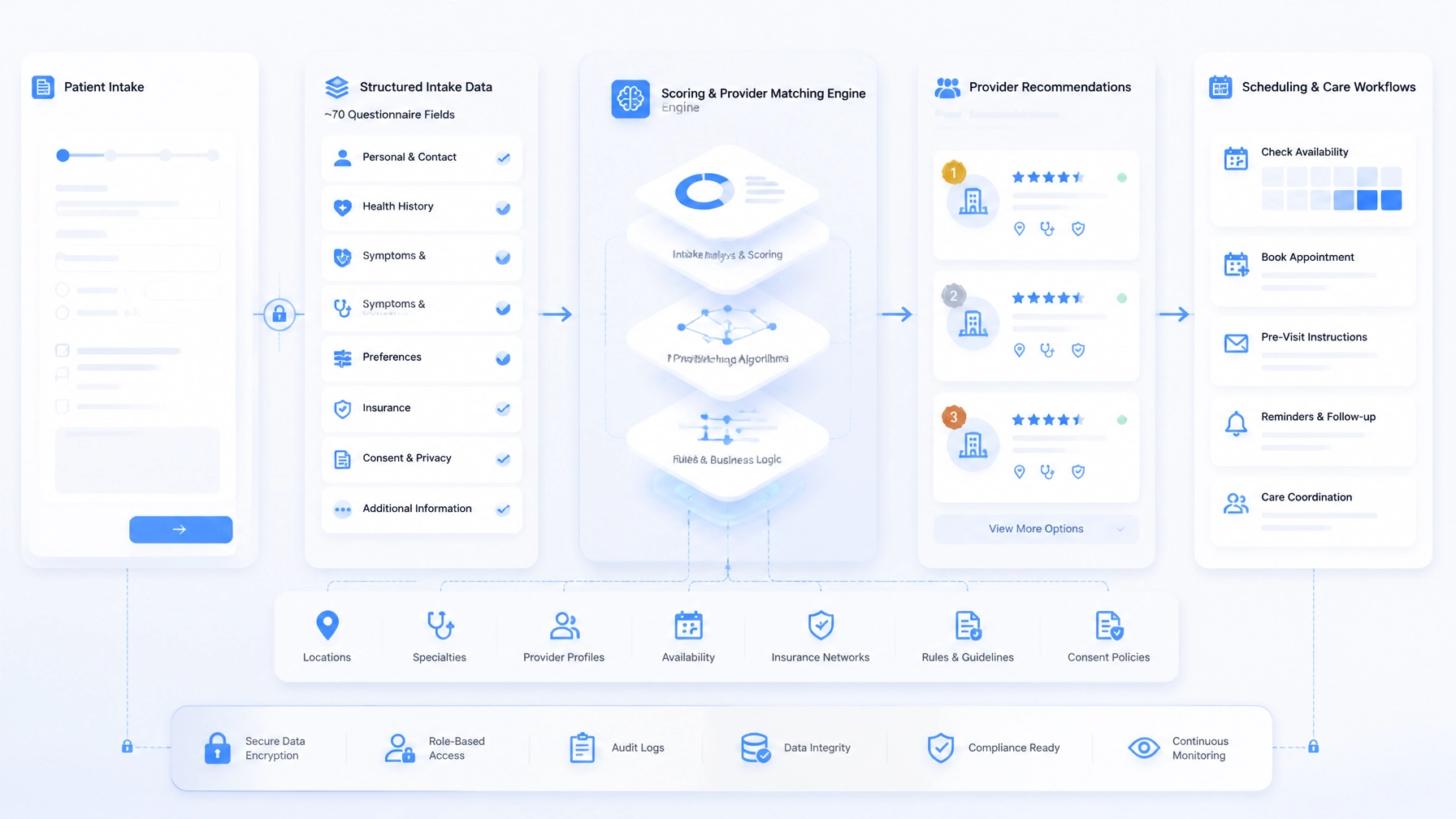
    Structured healthcare workflow illustration showing intake data flowing into matching, scheduling, integrations, and staff review

    A rules-based matching engine configured for each practice

    The matching engine was designed to answer a more useful question than “Who is available?”

    The operational question is:

    Which provider, location, and appointment format represent the best fit for this patient under the practice’s rules?

    EHRIO Pro separates hard eligibility constraints from softer preferences. That distinction prevents an optional preference from creating a false no-match.

    Hard constraints establish eligibility

    Depending on the practice, hard filters may include:

    • Required specialty or clinical service
    • Provider qualifications and licensure
    • Insurance participation or eligibility
    • Geographic boundaries and service areas
    • Age or program eligibility
    • In-person or telehealth requirements
    • Provider availability and new-patient capacity
    • Location-specific operational restrictions

    If a provider fails a required condition, that provider is removed from consideration.

    Weighted preferences rank viable options

    After eligible providers and locations are identified, the engine can rank options using configurable preferences such as:

    • Preferred appointment window
    • Telehealth versus in-person care
    • Distance from the patient
    • Language concordance
    • Requested provider characteristics
    • Continuity of care
    • Current schedule utilization
    • Appointment duration and capacity

    This architecture allows each practice to define its own operating model. A behavioral health group may prioritize modality, language, acuity, and specialty. A physical therapy organization may emphasize service line, referral type, location, and schedule capacity. A multi-location wellness group may configure different rules for each site.

    The logic is not intended to make an autonomous clinical diagnosis. Acuity should function as a safety and routing signal. High-risk, ambiguous, or incomplete cases should be escalated to qualified staff according to the practice’s policies.

    The resulting output may be a ranked recommendation, a direct scheduling path, a priority queue, or a request for additional information.

    Configuration matters more than hard-coded logic

    Healthcare organizations change. Providers join and leave. New locations open. Insurance relationships evolve. Services are added. Scheduling policies are revised.

    A system that requires a software release for every operational change quickly becomes expensive to maintain. EHRIO Pro was therefore designed around configurable entities and rules rather than a workflow hard-coded into one implementation.

    The configurable layer can include:

    • Intake questions and response types
    • Required and optional fields
    • Conditional question paths
    • Provider specialties and capabilities
    • Location service areas
    • Insurance and eligibility matrices
    • Modality and appointment rules
    • Matching weights and scoring criteria
    • Acuity thresholds and escalation paths
    • Staff queues, notifications, and follow-up actions

    Versioning is equally important. When a match is generated, the organization should be able to identify which intake configuration, provider data, and matching rule set were active at that time.

    That makes change governable. If match acceptance, scheduling speed, or exception volume changes after a rule update, operators can investigate the reason instead of relying on memory or scattered notes.

    Multi-location routing and schedule utilization

    Multi-location healthcare groups need central governance without losing local operating context.

    EHRIO Pro demonstrates a shared-platform model in which organization-wide standards can coexist with location-specific configuration.

    Central governance may define:

    • Common intake taxonomies
    • Standard workflow statuses
    • Organization-wide access policies
    • Shared specialty and service definitions
    • Consistent reporting structures
    • Integration and exception-monitoring practices

    Each location can then maintain its own:

    • Providers and specialties
    • Accepted payers
    • Availability and appointment types
    • Service boundaries
    • Scheduling constraints
    • Staff permissions
    • Escalation procedures

    This structure supports more deliberate schedule utilization. Instead of routing every case to the nearest location or first available provider, the engine can consider capacity, service fit, payer eligibility, modality, and the operational rules of each site.

    A new location should not require a disconnected collection of forms, calendars, and spreadsheets. It should involve configuring a governed operating model within an architecture that already understands the organization’s core entities and workflow states.

    HIPAA-adjacent handling and audit trails

    Healthcare automation requires more than a login screen and a database. It requires deliberate decisions about access, data movement, retention, monitoring, and accountability.

    EHRIO Pro demonstrates a HIPAA-adjacent architecture that can support controls such as:

    • Role-based access for intake, clinical, administrative, and leadership users
    • Location-aware permissions
    • Separation between operational intake data and clinical records
    • Controlled access to sensitive fields
    • Consent and communication tracking
    • Encryption in transit and at rest
    • Audit logging for record access and workflow changes
    • Controlled staff overrides
    • Integration monitoring and error visibility

    A production deployment would still require a client-specific security and compliance assessment. That assessment should consider the organization’s policies, business associate agreements, vendors, data classification, retention requirements, hosting environment, and applicable legal obligations.

    Auditability is especially important in a matching workflow. Recording only the final provider assignment is not enough. A useful event history may include:

    • Intake workflow and version
    • Answers used in the decision
    • Eligibility results
    • Providers or locations excluded by hard constraints
    • Matching scores and rationale
    • Rule-set version
    • Staff overrides and reviewer identity
    • Workflow transitions
    • Integration errors and synchronization status

    This creates a defensible operational trail for quality improvement, troubleshooting, governance, and staff training.

    Secure healthcare integration and audit monitoring dashboard showing workflow status, access controls, synchronization, and event history

    What practice operators see in reporting

    A sophisticated backend is only valuable if it improves operational visibility.

    EHRIO Pro’s reporting model is designed around the questions practice operators and executives need to answer:

    • How many inquiries started an intake?
    • Where are patients abandoning the process?
    • How long does it take to move from referral to scheduling?
    • Which locations are receiving the greatest demand?
    • Where are exceptions accumulating?
    • How often are recommendations accepted or overridden?
    • Which providers or sites have available capacity?
    • How frequently does incomplete information delay scheduling?
    • Which referral sources generate qualified demand?
    • Which rules produce the greatest number of no-match outcomes?

    The reporting layer can give managers a view of throughput, utilization, exception volume, intake completion, and routing outcomes by location or service line.

    These measures should be compared with the organization’s own baseline. The value is not a generic promise of improvement. The value is the ability to observe how the operating model performs, identify bottlenecks, and refine the rules with evidence.

    Healthcare operations reporting dashboard showing intake throughput, location performance, provider utilization, exceptions, and workflow outcomes

    What EHRIO Pro proves about custom development

    EHRIO Pro demonstrates a combination of capabilities that generic form tools rarely provide as one coherent system:

    • Structured, conditional clinical intake
    • Rules-based provider and location matching
    • Specialty, modality, insurance, availability, and acuity-aware routing
    • Multi-location configuration and governance
    • Scheduling and capacity considerations
    • Role- and location-aware access controls
    • Audit-oriented workflow history
    • Exception queues and human review
    • Integration-ready architecture
    • Operational dashboards and reporting

    The broader lesson is product-agnostic: the data model and matching rules are the asset; the interface is replaceable.

    That principle applies beyond healthcare. A legal intake system may use the same disciplines for conflict checks, matter classification, jurisdiction, attorney capacity, and document collection. An accounting workflow may apply them to client eligibility, service requirements, deadlines, staff expertise, and review queues.

    PTC brings proven patterns from healthcare, field operations, fintech, debt operations, and local SEO automation into new custom engagements. Those patterns include:

    • Healthcare: structured intake, matching engines, 70-question workflows, and HIPAA-adjacent controls
    • Field operations: D2D Tracking with rep accountability and GPS logging
    • Fintech and debt: telephony integrations and call attribution
    • Local SEO: AI Local Boost automation for Google Business Profiles

    The implementation changes by industry. The engineering discipline remains consistent: model the work correctly, make decisions traceable, connect systems deliberately, and preserve human oversight where judgment matters.

    A premium engagement should begin with the operating model

    A comparable custom healthcare engagement may include architecture, data modeling, workflow design, configurable matching logic, integrations, access controls, reporting, testing, rollout, and post-launch support.

    That is why this work should be treated as a premium, scoped technology initiative rather than a form-building exercise. The right architecture depends on the organization’s locations, systems, payer relationships, service lines, workflow ownership, and compliance requirements.

    For healthcare groups, the next step may be a workflow audit or a focused proof of concept for one location or service line. For legal and accounting firms, it may be an intake and routing system adapted from the same underlying principles.

    If disconnected systems, manual triage, or limited schedule visibility are constraining growth, book a discovery consultation with Pure Technology Consulting. You can also review our custom web development capabilities and related work on complex intake automation.

    Contact: +1 (803) 921-0969

    Amin Said, Founder of Pure Technology Consulting LLC
    https://puretechconsult.com

  • Business Process Automation Consulting: Why the Process Map Comes Before the Software

    Business Process Automation Consulting: Why the Process Map Comes Before the Software

    Amin Said

    Digital transformation rarely fails because an organization lacks access to software. More often, it fails because the business has not agreed on how work should move before technology is asked to move it.

    A leadership team may purchase a CRM, workflow platform, AI assistant, scheduling system, or integration tool with a clear objective: improve efficiency and create room for growth. Yet the new system often inherits the same unclear ownership, duplicated data, inconsistent decisions, and hidden workarounds that existed before implementation.

    The result is faster activity without meaningful operational leverage.

    That is why effective business process automation consulting begins with an honest process map. Before selecting software, writing integrations, or introducing AI workflow automation, leaders need to understand how work actually enters the organization, how decisions are made, where information changes hands, and what happens when the normal path breaks.

    The process map is not administrative preparation. It is the strategic foundation of the automation program.

    A process map reveals the operating model beneath the tools

    A process is more than a sequence of software screens. It is the interaction between people, decisions, information, systems, rules, and exceptions.

    Consider a high-ticket service business managing a new client or patient. The visible process may appear simple:

    1. A prospect submits an inquiry.
    2. The team reviews the information.
    3. Someone schedules a consultation.
    4. Staff members prepare for service delivery.
    5. Billing and follow-up begin.

    The actual process may be much more complex. A coordinator may copy information from an email into a CRM, check availability in a separate system, request missing documents by phone, consult a manager about eligibility, and update a spreadsheet because the primary platform does not support a critical business rule.

    If those steps are not documented, software decisions are based on an incomplete version of reality.

    An honest map captures:

    • Where the process begins and what outcome it should produce
    • Which roles own each stage
    • What information is required to advance
    • Which decisions are rules-based and which require judgment
    • Where data is entered, transformed, duplicated, or lost
    • What exceptions occur and how staff handle them
    • Which systems support the workflow
    • How performance, risk, and quality are measured

    This perspective is central to serious digital transformation consulting. The goal is not simply to digitize existing activity. It is to understand the operating model well enough to improve it.

    Blue and white editorial illustration showing intake, scheduling, documents, analytics, and customer records connected through a central process map

    Why tool-first automation creates expensive compromises

    A tool-first approach starts with a platform and asks the business to fit around it. That may be appropriate for a straightforward, standardized workflow. It becomes risky when the process is a source of differentiation or includes substantial operational complexity.

    Common symptoms include:

    • Employees maintaining shadow spreadsheets beside the official system
    • Staff manually reconciling records between platforms
    • Managers approving work through email because system permissions are unclear
    • AI outputs being reviewed inconsistently
    • Exceptions disappearing into inboxes or chat threads
    • Teams optimizing one department while creating delays for another
    • Reporting that measures activity but not process health

    In these environments, automation can preserve inefficiency while making it less visible. A workflow may move more quickly, but the organization still receives incomplete data, applies inconsistent judgment, or struggles to explain why a decision was made.

    This is particularly consequential for healthcare, legal, accounting, financial operations, field services, and other high-value environments. The cost of a poorly designed workflow is not limited to wasted time. It may include missed revenue, compliance exposure, client dissatisfaction, rework, and loss of management confidence.

    The better sequence is straightforward:

    Map the current process, redesign the target process, then select the technology that can support it.

    What an honest process map should make visible

    A useful process map is not a decorative flowchart. It is a decision-making instrument.

    1. The actual path of work

    Document how work moves today, including the steps that are not officially documented. Interviews with staff are important because employees often compensate for system limitations through manual workarounds.

    The question is not, “How is this process supposed to work?”

    It is, “What happens from the moment a request arrives until the business considers it complete?”

    2. Ownership and decision rights

    Every stage should have a clear owner. If multiple people are involved, the map should distinguish between responsibility, approval, consultation, and notification.

    Ambiguous ownership is one of the most common reasons automation stalls. A system can route a task, but it cannot resolve an unresolved decision about who is accountable for the outcome.

    3. Data movement

    The map should show where information originates, where it is stored, and where it must be reused. This exposes duplicate entry, conflicting records, missing fields, and weak system boundaries.

    It also provides the foundation for a durable data model and integration architecture. Without this view, teams often automate individual steps while leaving the underlying data fragmentation untouched.

    4. Exceptions and judgment

    The normal path is only part of the process. A mature map documents what happens when information is incomplete, a customer does not meet standard criteria, a schedule changes, or a system cannot make a confident recommendation.

    These exceptions determine where AI can assist, where rules should govern, and where a person must remain responsible.

    Governed AI workflow illustration with validation checkpoints, human approvals, exception routing, and audit trails

    AI compounds the quality of the process beneath it

    AI workflow automation is most valuable when it operates inside a well-defined process. It can classify information, identify missing details, summarize records, recommend assignments, draft communications, and surface unusual patterns.

    However, AI does not eliminate the need for process design. It increases the importance of it.

    If the underlying workflow is inconsistent, AI may produce inconsistent recommendations. If the data model is unclear, the system may act on incomplete context. If approval boundaries are undefined, employees may either over-trust the system or ignore it entirely.

    A process map gives AI a structured environment in which to operate. It clarifies:

    • Which inputs the system can trust
    • Which decisions can be automated
    • What confidence threshold requires human review
    • Which actions the system may take
    • How recommendations should be recorded
    • What happens when the system cannot determine the next step

    This is the difference between adding an AI feature and designing a governed AI operating capability.

    In enterprise automation consulting, the objective is not to maximize the number of automated actions. It is to create a reliable division of work between people, rules, integrations, and intelligent systems.

    When the process map points toward custom software

    A process map does not automatically lead to a custom application. Sometimes it confirms that an existing platform is sufficient. In other cases, it shows that the business needs an orchestration layer connecting several systems.

    Custom web application development becomes a stronger option when the organization needs to:

    • Coordinate complex intake, qualification, and assignment logic
    • Connect CRM, scheduling, billing, communication, and reporting systems
    • Support multiple locations, teams, or user roles
    • Apply specialized approval and escalation rules
    • Provide a secure portal for clients, partners, or staff
    • Maintain a detailed audit trail
    • Create dashboards based on operational rather than vanity metrics
    • Build a workflow that reflects a competitive service model

    Pure Technology Consulting’s proprietary platforms illustrate these patterns without serving as one-size-fits-all products.

    ChainHQ demonstrates how location, capacity, availability, and business rules can be coordinated through a custom assignment workflow. AI Local Boost reflects the need for multi-location automation, governance, approvals, and reporting. EHRIO Pro demonstrates how structured intake and matching logic can support complex healthcare workflows.

    The common lesson is not that every company needs the same platform. It is that valuable software begins with a precise understanding of the process it must support.

    What should come from a process-first automation engagement?

    A strong consulting engagement should produce more than a recommendation to “implement AI.” It should create a practical roadmap that stakeholders can use to make investment decisions.

    Typical deliverables include:

    • Current-state process maps
    • Future-state workflow designs
    • Systems and integration inventory
    • Data and ownership requirements
    • Automation opportunity backlog
    • Human-versus-automation decision boundaries
    • Exception and escalation rules
    • Security and governance requirements
    • KPI definitions and measurement baselines
    • Technical architecture recommendations
    • Pilot scope and implementation roadmap

    The roadmap should also explain what not to automate yet. A process may be strategically important but not ready because data is incomplete, ownership is unclear, or the workflow changes too frequently.

    That discipline protects the organization from expensive experimentation and keeps the focus on measurable business outcomes.

    Relevant measures may include cycle time, manual touches per transaction, error and rework rates, exception volume, response time, throughput, and staff capacity returned to higher-value work. The right metric depends on the process, but the principle remains consistent: define the baseline before changing the system.

    Digital transformation roadmap showing fragmented tools becoming a connected, governed business operating system

    The process map is where transformation becomes practical

    The future of business automation will not be determined by the number of tools an organization adopts. It will be determined by whether those tools reinforce a coherent way of working.

    A process map creates that coherence. It gives leadership a shared view of the business, gives technical teams a clear implementation target, and gives employees a voice in how the future workflow should operate.

    For growth-focused service businesses, this is where transformation becomes tangible. A counseling center can clarify how intake, matching, scheduling, and follow-up should connect. A law or accounting firm can define how inquiries become qualified matters. A field operation can establish how assignments, GPS activity, accountability, and reporting should work together. A debt agency can map the relationship between telephony, attribution, records, and collections activity.

    The technology comes after the clarity.

    Pure Technology Consulting helps organizations turn that clarity into custom web applications, integrated systems, and governed AI workflow automation. Explore the company’s custom web development capabilities, or schedule a discovery call to discuss a process that is limiting growth.

    For direct inquiries, call +1 (803) 921-0969.

    Amin Said, Founder of Pure Technology Consulting LLC
    https://puretechconsult.com

  • Case Study: Custom Web Application Development for a Regional Law Firm, Automating Intake, Conflict Checks, and Matter Opening

    Case Study: Custom Web Application Development for a Regional Law Firm, Automating Intake, Conflict Checks, and Matter Opening

    Amin Said, Founder of Pure Technology Consulting LLC

    For a growing law firm, revenue can be lost before a matter is ever opened.

    That was the operating challenge for a mid-size regional firm with multiple offices and approximately 40 staff across business law, estate planning, and family law. The firm had a strong referral network and experienced attorneys, but its intake process depended on email, PDF forms, spreadsheets, and repeated manual entry.

    The firm engaged Pure Technology Consulting to design a bespoke web application that would connect intake, conflict checks, engagement capture, matter opening, and referral reporting in one governed workflow.

    The objective was not to replace attorney judgment. It was to give attorneys and staff a clearer operating system for the decisions they already needed to make.

    Note: The firm in this case study is anonymized. Outcome figures are presented against the engagement’s measured baseline and should not be treated as universal benchmarks.

    The operating challenge: valuable inquiries were entering a fragmented funnel

    Before the engagement, a new inquiry could move through several disconnected steps:

    1. A prospective client submitted a website form or sent an email.
    2. An intake coordinator copied information into a 30-question PDF form.
    3. The completed form was circulated by email.
    4. A staff member manually searched Excel files for potential conflicts.
    5. A partner reviewed the inquiry and determined whether the firm could accept it.
    6. Staff recreated information in the practice management, document, and billing systems.
    7. An engagement letter was prepared, sent for signature, and tracked separately.
    8. Referral-source information was often incomplete or unavailable for reporting.

    Each step appeared manageable in isolation. Together, they created delays and uncertainty.

    The firm could not reliably answer several executive questions:

    • How long did an inquiry take to become a signed engagement?
    • Which matters were waiting for partner review?
    • How much administrative time was spent on conflict searches?
    • Which referral sources produced qualified, signed work?
    • Where did matter-opening delays occur between acceptance and operational readiness?

    The central issue was not a lack of software. It was the absence of a connected workflow and a trusted data model.

    The solution: a structured intake and matter-opening platform

    Pure Technology Consulting designed a custom web application around the firm’s operating model rather than asking the firm to force its process into a generic intake tool.

    The platform created a single workflow from first inquiry through matter opening, with human approvals preserved at the points where legal judgment and risk management were required.

    Adaptive legal intake workflow branching by practice area and routing structured information for review

    A branded intake experience with adaptive logic

    The public-facing intake experience was redesigned as a structured, branded workflow instead of a static PDF.

    The application uses branching logic to adapt questions based on the selected practice area. A business-law inquiry follows a different path from an estate-planning or family-law inquiry. This reduces unnecessary questions while ensuring the firm collects the information needed for early review.

    Typical intake data includes:

    • Prospective client and organization details
    • Matter type and practice area
    • Jurisdiction and location
    • Relevant opposing or related parties
    • Urgency and desired timeline
    • Referral source and referring contact
    • Initial document and service requirements
    • Consent and acknowledgment language

    The approach draws on a pattern Pure Technology Consulting has used in healthcare work, including the structured 70-question clinical intake and intelligent matching logic behind EHRIO Pro. That work demonstrated how complex forms can become adaptive decision systems rather than long questionnaires.

    For the law firm, the same architectural principle meant that intake data could be structured, searched, validated, routed, and reused downstream.

    Automated conflict-check scoring against a consolidated party index

    The firm’s prior conflict process relied heavily on manual searches across Excel files and existing records. The new platform introduced a consolidated party index designed around the relationships that matter in legal work.

    The system can associate people and organizations with:

    • Current and former matters
    • Related entities
    • Opposing parties
    • Family members and beneficiaries
    • Business owners and affiliates
    • Referring attorneys and firms
    • Other relevant roles defined by the firm

    Rather than presenting a simple yes-or-no result, the application generates a conflict-check score and routes potential matches for review. Name variations, related parties, and incomplete information can be flagged for human assessment.

    Automated conflict-check and matter-opening workflow connecting a consolidated party index to secure matter provisioning

    The workflow records who ran the check, what information was reviewed, how the result was classified, and whether additional approval or documentation was required.

    This is an important distinction. Automation accelerates identification and triage. It does not independently determine whether a firm can accept a matter.

    One-click matter opening with controlled provisioning

    Once the intake was approved and conflicts were cleared, staff no longer needed to recreate the same information across several systems.

    The application’s matter-opening workflow provisions the operational foundation for the new engagement, including:

    • Standardized folder structures
    • Practice-area document templates
    • Matter naming and identification conventions
    • Billing codes and fee arrangements
    • Responsible attorney and staff assignments
    • Engagement-letter generation
    • E-signature routing
    • Retainer capture and status tracking
    • Notifications and follow-up tasks

    The firm retained control over the templates, approval thresholds, and exceptions. The platform simply made those rules executable and visible.

    This type of controlled data exchange reflects the same architectural discipline used in FTP Inform, a Pure Technology Consulting proof-of-work example for governed and auditable movement of information between systems. In both environments, the goal is not merely to move data. It is to preserve context, permissions, status, and accountability as information travels.

    Referral attribution became part of the operating model

    Referral data was previously collected inconsistently. Some inquiries included a referring attorney or client; others only identified a general source such as “website” or “other.”

    The new workflow captures referral information at the beginning of the intake process and carries it through to the matter record.

    The resulting dashboard can help leadership evaluate:

    • Inquiry volume by referral source
    • Conversion from inquiry to signed engagement
    • Practice areas associated with each source
    • Office-level performance
    • Average cycle time by source
    • Matter value and status, subject to the firm’s reporting policies
    • Referral relationships that warrant further attention

    The benefit is not simply better marketing reporting. It is a more complete view of how business development activity connects to accepted work.

    Referral reporting must still be configured with the firm’s professional-responsibility obligations in mind. Attribution fields, disclosures, and referral arrangements should be reviewed by the firm’s leadership and counsel where appropriate.

    Measured outcomes from the pilot workflow

    The initial rollout began with a controlled pilot at one office. The team established a baseline before expanding the workflow.

    Against that baseline, the firm measured several improvements:

    • Intake-to-signed-engagement cycle time: reduced from a process that commonly took multiple business days to same-day completion in most straightforward cases.
    • Partner review effort: reduced materially because partners received structured summaries and clearer conflict-review results instead of reviewing scattered emails and attachments.
    • Matter-opening consistency: improved through standardized templates, billing codes, folder structures, and assigned tasks.
    • Referral visibility: improved from incomplete source fields to source-level reporting connected to signed engagements.
    • Operational accountability: improved because every major status change had an owner, timestamp, and recorded workflow history.

    These results came from the engagement’s measured pilot baseline. They are not claims that every law firm will achieve the same outcome. The impact of a custom platform depends on intake volume, system quality, approval complexity, adoption, and the firm’s ability to standardize its operating model.

    Why a custom application was the appropriate investment

    An off-the-shelf form tool could have collected information. A practice management system could have stored matters. An e-signature platform could have captured signatures.

    The challenge was connecting those capabilities around the firm’s specific process.

    Custom web application development was appropriate because the firm needed to:

    • Support several practice areas with different intake paths
    • Consolidate party and matter relationships for conflict review
    • Preserve partner and conflicts-team approval steps
    • Connect intake to matter provisioning
    • Support multiple offices and role-based access
    • Capture referral attribution at the source
    • Maintain an audit-oriented workflow history
    • Integrate with existing systems rather than replace them all at once

    Pure Technology Consulting’s broader experience with complex systems informed the architecture. ChainHQ provided proof of capability in multi-location performance, role-based access, and compliance-oriented reporting. EHRIO Pro demonstrated structured intake and intelligent matching. FTP Inform demonstrated governed data exchange and activity visibility.

    These are not products being promoted to law firms. They are examples of the engineering patterns required to build scalable, specialized business systems.

    A phased roadmap for a $10k+ custom build

    A platform of this type is typically a premium, scoped engagement rather than a small website project. A realistic build generally falls within a $10,000+ range, depending on integrations, security requirements, workflow depth, user roles, and reporting needs.

    A practical roadmap includes:

    1. Discovery and process mapping
      Document current intake, conflict, approval, engagement, matter-opening, and referral workflows.

    2. Data and architecture design
      Define the party index, matter relationships, permissions, integrations, audit events, and reporting model.

    3. Pilot at one office or practice group
      Build the core intake and matter-opening workflow, validate it with real users, and establish baseline measurements.

    4. Firm-wide rollout
      Expand the system across offices and practice areas after the pilot workflow has been tested and refined.

    5. Optimization and additional automation
      Add deeper integrations, document intelligence, dashboards, and carefully governed AI assistance where the business case is clear.

    The best starting point is usually the workflow where delays, staff effort, and revenue visibility can be measured clearly.

    The broader lesson: automate the handoffs, not the judgment

    For professional services firms, transformation does not require removing people from important decisions. It requires removing avoidable friction from the path to those decisions.

    A structured intake system gives the firm better information earlier. A consolidated party index makes conflict review more consistent. Automated matter opening reduces duplicate entry. Referral attribution gives leadership a clearer view of growth. Audit-oriented workflows create accountability without turning every step into a manual status meeting.

    That is the role of custom software in a high-value legal operation: to create leverage around professional judgment.

    If your firm is evaluating intake automation, conflict-check modernization, matter opening, or referral reporting, schedule a workflow discovery consultation or call +1 (803) 921-0969. Pure Technology Consulting can help map the current-state process, identify the highest-value starting point, and define a phased roadmap for a secure custom web application.

    Amin Said, Founder of Pure Technology Consulting LLC
    https://puretechconsult.com

  • AI-Powered Business Systems: Where Human Judgment Belongs in an Automated Operating Model

    AI-Powered Business Systems: Where Human Judgment Belongs in an Automated Operating Model

    Amin Said, Founder of Pure Technology Consulting LLC

    The most valuable AI-powered business systems do not attempt to remove human judgment from the organization. They make judgment more focused, better informed, and easier to apply consistently.

    That distinction matters for any business evaluating AI workflow automation, custom web application development, or enterprise automation consulting. The question is not simply what artificial intelligence can do. The more important question is where the system should act, where it should prepare a decision for review, and where leadership must retain direct authority.

    A well-designed automated operating model turns those boundaries into software. It defines responsibilities, thresholds, escalation paths, approval requirements, and audit history before the first workflow is deployed.

    Automation should coordinate work; leadership should govern decisions

    Most organizations do not suffer from a lack of software. They suffer from disconnected systems, unclear ownership, and decisions that remain hidden inside email, spreadsheets, and individual memory.

    An AI-powered business system can connect intake, data, communication, scheduling, reporting, and operational follow-up. It can classify incoming requests, summarize records, route work, identify missing information, recommend next steps, and monitor service-level commitments.

    But coordination is different from judgment.

    A system may know that an intake is incomplete. It may not have the authority to decide whether an exception should be accepted.

    A system may identify a likely client, patient, account, or provider match. It may not be qualified to make a high-consequence determination without review.

    A system may detect a financial anomaly. It should not necessarily approve a payment or override a control.

    The objective is to automate the movement of work while preserving accountability for decisions that affect customers, employees, compliance, finances, reputation, or strategy.

    The three decision tiers of an automated operating model

    Executives evaluating a custom build should begin by placing decisions into three practical tiers.

    1. Decisions the system can make

    These are repeatable, low-risk decisions with clear inputs and predictable outcomes.

    Examples include:

    • Routing a request to the correct operational queue
    • Sending a reminder when a required document is missing
    • Updating a status after a verified system event
    • Assigning a task based on location, service type, or availability
    • Generating a standard internal notification
    • Synchronizing approved information between connected systems

    The system can act independently when the policy is clear, the data is sufficiently reliable, and the action is reversible or low consequence.

    This is where AI workflow automation often creates immediate operational leverage. Employees no longer spend time coordinating routine work, monitoring basic deadlines, or transferring information between applications.

    2. Decisions the system should prepare

    These decisions benefit from AI analysis but still require an authorized person to approve or reject the recommendation.

    Examples include:

    • Prioritizing a high-value lead
    • Recommending a provider, service team, or account assignment
    • Drafting a response to a sensitive customer issue
    • Flagging an invoice or transaction for possible anomaly
    • Summarizing a legal, accounting, healthcare, or operational intake
    • Suggesting a next action based on customer history

    In this tier, the system should present the relevant evidence, confidence indicators, policy references, and possible consequences. The human reviewer should not need to reconstruct the entire case from multiple systems.

    The interface should make the decision visible:

    • What did the system observe?
    • What recommendation did it produce?
    • Which rules or thresholds were applied?
    • What information is missing?
    • What happens if the recommendation is approved?
    • Who is authorized to override it?

    AI prepares the decision. The accountable professional makes it.

    3. Decisions that must remain with leadership

    Some decisions are too consequential, ambiguous, or strategic to delegate to an automated system.

    Leadership should generally retain authority over:

    • Changes to organizational policy
    • High-value financial commitments
    • Material changes to pricing, compensation, or risk tolerance
    • Exceptions involving legal, regulatory, or reputational exposure
    • Decisions that materially affect an employee, customer, patient, client, or partner
    • Changes to the system’s approval thresholds or access model
    • Strategic prioritization across departments or business units

    The system can provide analysis, scenario modeling, and recommendations. It should not quietly convert an executive policy choice into an automated rule without formal approval.

    Three governed automation lanes showing autonomous coordination, human approval, and leadership judgment

    How to encode the boundary into software

    Human oversight is not effective when it exists only in a policy document. The operating model should enforce the boundary through system design.

    Define the decision

    Each automated action should have a clear definition. Identify the trigger, required data, expected outcome, responsible owner, and permitted exceptions.

    For example:

    When a verified customer submits a complete request below a defined value threshold, the system may create and route the task automatically.

    This is more useful than a vague instruction such as “automate customer requests.”

    Set thresholds

    Thresholds determine when an action can proceed automatically and when it must be reviewed.

    Possible thresholds include:

    • Financial value
    • Risk score
    • Confidence score
    • Customer or account tier
    • Geographic region
    • Data sensitivity
    • Number of prior exceptions
    • Time elapsed without resolution
    • Regulatory or contractual category

    A low-risk invoice from a verified vendor may follow a different path from a high-value invoice with unusual account details. A routine intake may move forward automatically, while an incomplete or ambiguous submission enters a review queue.

    Thresholds should be configurable, versioned, and tied to an accountable owner. They should not be buried inside application code where business leaders cannot review or change them safely.

    Design escalation paths

    An escalation path answers what happens when a workflow falls outside normal conditions.

    A useful escalation model specifies:

    • Which event triggers escalation
    • Which role receives the case
    • How quickly the case must be reviewed
    • What information the reviewer receives
    • What happens if the reviewer does not act
    • Whether the case escalates further
    • How the final resolution is recorded

    For example, an AI system may route a request to a manager when confidence falls below an approved threshold. If the request remains unresolved beyond the service-level target, it may escalate to an operations director.

    Escalation should move with context. The reviewer should receive the relevant record, recommendation, history, and reason for escalation rather than a notification that simply says “manual review required.”

    Require approvals where authority matters

    Approval workflows should be based on role and responsibility, not merely on who happens to be available.

    A custom web application can support:

    • Role-based approval matrices
    • Separation of duties
    • Dual approval for sensitive actions
    • Delegated approval with expiration dates
    • Approval comments and rejection reasons
    • Reversible actions with defined time windows
    • Approval status dashboards

    This approach is especially important in healthcare, legal, accounting, debt, financial, and multi-location environments where accountability must be visible.

    Preserve audit history

    A mature AI-powered business system should record more than the final outcome. It should preserve the decision path.

    An audit history may include:

    • Source data and documents
    • AI model or service version
    • Prompt or workflow configuration
    • Recommendation and confidence score
    • Rules and thresholds applied
    • Human approvals, rejections, and overrides
    • User identity and timestamp
    • System changes made after the decision
    • Final outcome and exception reason

    The NIST AI Risk Management Framework provides a useful reference for thinking about trustworthy AI practices, including governance, measurement, and ongoing risk management.

    Layered AI business system architecture with integrations, orchestration, governance, approvals, and audit history

    What the architecture should contain

    For a high-ticket custom build, the architecture should reflect both operational needs and decision boundaries.

    A practical system may include:

    • Data and integration layer: Connects CRM, scheduling, accounting, communication, EHR-adjacent, telephony, or internal systems.
    • Workflow orchestration: Manages triggers, tasks, handoffs, service levels, and status transitions.
    • AI services: Classifies, summarizes, extracts, drafts, predicts, and recommends.
    • Policy engine: Applies deterministic rules, permissions, thresholds, and required approvals.
    • Human workspaces: Gives operators and leaders queues, dashboards, review screens, and exception views.
    • Audit and observability: Records events, changes, outcomes, failures, overrides, and system health.
    • Security controls: Enforces role-based access, least privilege, data isolation, and appropriate retention.

    This architecture is more durable than connecting a language model directly to business systems and allowing it to act without a governed operating layer.

    Estimating a custom build responsibly

    Early estimates should be based on assumptions rather than false precision.

    For a bounded workflow with one or two integrations, defined roles, a basic review interface, and limited AI assistance, a discovery and architecture phase may take approximately 2–4 weeks, with a planning range of $5,000–$15,000.

    A focused production pilot with a custom interface, several workflow states, approval rules, audit logging, and two to four integrations may reasonably fall in the $20,000–$50,000 range. This assumes the client has accessible APIs, stable business rules, a defined user group, and no major compliance certification requirement.

    A broader operating layer spanning multiple departments, entities, locations, or regulated workflows may require $50,000–$150,000 or more. The range depends on data migration, integration complexity, security controls, reporting depth, exception volume, and the number of roles and approval paths.

    These are estimation ranges, not quotations. The most reliable scope emerges after documenting:

    • Current-state workflows
    • Systems and integration constraints
    • Data ownership
    • Decision categories
    • Approval and escalation requirements
    • Security and compliance expectations
    • Baseline measures such as cycle time, manual touches, and error rates

    PTC’s proprietary builds illustrate the type of complexity that can be addressed through custom development. EHRIO Pro demonstrates adaptive intake and intelligent matching for healthcare workflows. ChainHQ demonstrates location-aware architecture and centralized operational visibility. FTP Inform demonstrates governed data exchange, validation, and audit-oriented processing. AI Local Boost demonstrates multi-entity workflow automation, role-based control, and scalable orchestration.

    These systems are referenced as proof-of-concept examples of custom development capability, not as products to purchase.

    Executive reviewing an AI-generated recommendation with evidence, approval controls, and audit timeline

    Build for leverage, not for automation theater

    The best AI-powered business systems do not maximize the number of tasks performed by machines. They maximize the quality and speed of work performed by the organization.

    That means automating coordination where the rules are clear, preparing decisions where analysis is valuable, and preserving leadership authority where consequences are material.

    For executives, the evaluation should focus on practical questions:

    • Which workflow currently limits growth?
    • Which decisions are repetitive enough to standardize?
    • Which exceptions require expertise?
    • Where is the organization exposed because accountability is unclear?
    • What evidence must be available before a human approves an action?
    • How will leadership measure whether the system is improving operations?

    Pure Technology Consulting helps organizations answer those questions through business automation consulting, custom web application development, and enterprise automation consulting. The starting point is not a generic AI feature list. It is a clear operating model connected to measurable business outcomes.

    To define the right automation boundary and scope a practical custom system, book a discovery call or call +1 (803) 921-0969.

    Amin Said, Founder of Pure Technology Consulting LLC
    https://puretechconsult.com

  • Case Study: ChainHQ. How a Custom Web Application Became the Single Source of Truth for Multi-Location Performance and Brand Compliance

    Case Study: ChainHQ. How a Custom Web Application Became the Single Source of Truth for Multi-Location Performance and Brand Compliance

    For a multi-location operator, growth creates a governance challenge.

    Each new location adds another operating environment to monitor, another team to support, another set of standards to maintain, and another source of performance data to reconcile. At a small scale, spreadsheets and email-based audits may appear manageable. As the network expands, they make it difficult to answer basic leadership questions with confidence:

    • Which locations are meeting performance expectations?
    • Where are brand standards being missed?
    • Which operational issues remain unresolved?
    • What capital investments are pending or complete?
    • Can regional and executive reports be verified back to source activity?

    Pure Technology Consulting developed ChainHQ as a proprietary proof-of-concept for solving this class of problem. It is not presented as a standalone product to purchase. Instead, ChainHQ demonstrates how PTC approaches custom web application development for organizations that need a governed operating layer across locations, teams, standards, and reporting.

    The system brings location performance, brand compliance, capital reporting, and operational intelligence into one structured environment.

    The business stakes of multi-location drift

    Multi-location performance rarely declines because leadership lacks commitment. More often, the operating model makes consistency difficult.

    Corporate teams may define clear expectations, but execution varies by location. A manager may use an outdated checklist. An audit may be completed without sufficient evidence. A regional leader may receive a report that cannot be traced to the underlying inspection. Capital projects may be discussed in email but remain difficult to compare across sites.

    Over time, small inconsistencies create material business risk:

    • Brand standards are interpreted differently from one location to another.
    • Performance reports are assembled manually and may use inconsistent definitions.
    • Corrective actions are tracked in inboxes or separate spreadsheets.
    • Capital requests lack a standardized status and approval history.
    • Leadership sees summary numbers without the context behind them.
    • Regional teams spend time validating reports instead of improving performance.

    The central issue is not the absence of data. It is the absence of a governed system that connects data to accountability.

    ChainHQ was designed around that distinction.

    Discovery began with the operating model

    A successful custom build does not begin with screens. It begins with the organization’s operating model.

    PTC’s discovery process mapped how information moves through a multi-location business:

    1. How locations are structured across regions, brands, and ownership groups.
    2. Which performance metrics are defined centrally and which vary by location.
    3. How brand standards are distributed, acknowledged, inspected, and updated.
    4. How audits are documented and how exceptions become corrective actions.
    5. How operational and capital reports are submitted, reviewed, approved, and rolled up.
    6. Which roles require access to local, regional, or enterprise-level information.
    7. Which existing systems should remain in place and which workflows required orchestration.

    This work shaped the data model before development began. A location was not treated as an isolated record. It became part of a connected structure involving users, regions, standards, audits, initiatives, performance indicators, capital items, tasks, and evidence.

    That foundation is what allows a custom application to act as a source of truth rather than another reporting interface.

    Layered architecture for a scalable custom web application connecting location data, standards, integrations, permissions, and audit history

    The architecture behind ChainHQ

    ChainHQ was organized around four architectural principles: a unified data model, an integration layer, governed permissions, and traceable activity.

    A unified location and performance data model

    The system establishes consistent identifiers for locations, regions, teams, standards, reporting periods, audits, capital items, and operational initiatives.

    That structure makes it possible to view information at several levels:

    • Individual location
    • Regional portfolio
    • Brand or operating group
    • Enterprise network
    • Reporting period
    • Performance or compliance category

    Leadership can see a network-level summary without losing the ability to examine the source records behind it. Regional managers can focus on their portfolio. Location leaders can see the actions and standards relevant to their responsibilities.

    The data model also supports consistent metric definitions. A compliance score, capital status, or operational KPI should mean the same thing across locations unless an explicit business rule says otherwise.

    An integration layer for connected reporting

    ChainHQ was designed to operate as an intelligence layer rather than require every existing system to be replaced.

    An integration layer can receive structured information from relevant operational, financial, project, or reporting systems. It can also send approved updates, notifications, and tasks to the systems or teams responsible for action.

    The exact integration approach depends on the client environment. APIs, webhooks, scheduled imports, and controlled exports may all be appropriate. The important design decision is to make data movement visible, validated, and accountable.

    This prevents the application from becoming another isolated database. It becomes the governed point where operational information is normalized, reviewed, and presented for decision-making.

    Roles and permissions that reflect responsibility

    Multi-location systems require more than a basic administrator and user model.

    ChainHQ’s approach separates access by organizational responsibility. A location manager may see local audits and assigned corrective actions. A regional manager may compare sites within a territory. A corporate standards team may manage templates and compliance criteria. Executives may need enterprise-level reporting without editing operational records.

    Role-based permissions help establish the appropriate balance between local ownership and central governance.

    Permissions can control:

    • Which locations a user can view
    • Which records a user can create or edit
    • Which standards can be changed
    • Which reports require approval
    • Which corrective actions can be closed
    • Which information is available at regional or enterprise level

    This is a core requirement in enterprise automation consulting. Automation must clarify ownership, not obscure it.

    Audit trails for defensible reporting

    A report is more valuable when leadership can understand how it was created.

    ChainHQ includes an audit-oriented approach to changes, approvals, submissions, and status updates. A governed system should be able to show:

    • Who submitted or changed a record
    • When the action occurred
    • Which standard or form version was used
    • What evidence was attached
    • Who reviewed or approved the item
    • Whether an exception was overridden
    • When a corrective action was assigned and closed

    This history improves accountability and makes reporting more defensible. If a score changes, the organization can investigate the underlying record rather than rely on conflicting email threads.

    What was built

    ChainHQ brought several operating functions into one application experience.

    Location performance dashboards

    Dashboards organize performance by location, region, category, and period. Instead of waiting for a manually assembled report, leaders can review current indicators and identify where additional attention is required.

    The dashboard model is designed to emphasize decisions rather than activity. A useful view should help answer:

    • Which locations are improving or declining?
    • Which standards have the most recurring exceptions?
    • Where are open actions aging?
    • Which regional patterns require intervention?
    • Are performance issues isolated or systemic?

    Brand standards and compliance workflows

    Brand standards become more actionable when they are connected to structured checklists, evidence, scoring, and follow-up.

    ChainHQ supports a governed standards library with version-controlled guidance and defined compliance criteria. Auditors or location leaders can complete inspections using consistent forms, attach supporting evidence, and route exceptions into an action workflow.

    This creates a complete path from standard to observation to corrective action.

    Capital and operational reporting

    Capital initiatives and operational improvements often require different data fields, approval paths, and reporting views.

    ChainHQ was designed to distinguish between the two while still allowing leadership to see them together. Capital records may include requested investment, location, category, status, approval stage, owner, and completion details. Operational records may track recurring issues, action plans, responsible teams, deadlines, and verification.

    A centralized view gives executives a better understanding of how location performance relates to investments and operating priorities.

    Enterprise command center rolling up location scorecards, compliance audits, capital projects, operational metrics, and corrective actions

    The operational leverage, with assumptions stated

    The value of a system like ChainHQ should be measured against a client’s baseline rather than a generic promise.

    For planning purposes, consider a network of 20 locations completing one monthly audit cycle. If each location currently requires 2–4 staff hours for preparation, consolidation, follow-up, and report assembly, the network may be spending approximately 40–80 hours per cycle on administrative coordination.

    If a governed workflow reduces that effort by an estimated 30–60%, the modeled capacity recovered would be approximately 12–48 hours per month. The actual result would depend on audit complexity, integration quality, adoption, and the number of exceptions requiring human review.

    Additional leverage may come from:

    • Reducing duplicate report preparation
    • Shortening the time required to identify overdue actions
    • Improving the percentage of audits supported by verifiable evidence
    • Reducing rework caused by inconsistent submissions
    • Increasing the number of locations a central team can oversee without proportional administrative growth

    These are planning ranges, not guaranteed outcomes. The important point is that a custom system creates measurable operating baselines. Leadership can track cycle time, exception volume, completion rates, and reporting effort before and after implementation.

    What executives should learn from the ChainHQ build

    ChainHQ illustrates several principles for organizations evaluating a custom system.

    Start with governance, not features

    A dashboard cannot compensate for unclear metric definitions, ownership, or approval rules. Establish the operating model first.

    Design the data model before the interface

    The quality of location, performance, compliance, and capital relationships determines whether the system can scale. A polished interface built on fragmented data will eventually reproduce the same reporting problems.

    Automate repeatable coordination while preserving judgment

    A system can assign actions, validate submissions, notify owners, and calculate scores. Human leaders should retain control over exceptions, standards changes, and high-impact decisions.

    Make evidence part of the workflow

    If compliance cannot be verified, it becomes a matter of interpretation. Evidence capture, version history, and approval records should be designed into the process rather than added later.

    Pilot with a meaningful but controlled scope

    A practical first phase might include a defined group of locations, a focused standards program, and one reporting cycle. Once the data model and governance are validated, the system can expand across additional regions and workflows.

    Why this capability transfers across industries

    ChainHQ is one proof-of-work example within PTC’s broader custom software development agency capabilities.

    The underlying disciplines also appear in other proprietary builds and engagements:

    • Healthcare: EHRIO matching engines and approximately 70-question adaptive intakes demonstrate structured decision workflows in HIPAA-adjacent environments.
    • Field operations: D2D Tracking connects rep accountability with GPS logging and distributed activity.
    • Fintech and debt: Debt-agency telephony integrations support call attribution, workflow history, and operational reporting.
    • Local SEO: AI Local Boost demonstrates governed Google Business Profile automation across multiple locations and entities.

    Across these projects, the recurring objective is the same: create an operating layer that connects data, people, decisions, and accountability.

    That is the role of business process automation consulting and AI-powered business systems when they are designed around the client’s actual operating model.

    Build a governed operating layer for your locations

    ChainHQ demonstrates how a multi-location business can move from spreadsheet-based oversight and email-driven audits to a more reliable system for performance, brand standards, capital visibility, and operational accountability.

    If your organization is evaluating a custom web application, enterprise reporting layer, or multi-location workflow transformation, book a discovery call with Pure Technology Consulting. A workflow audit can clarify the current-state process, identify the highest-value opportunity, and define a practical roadmap for a custom build.

    Learn more about custom web application development and explore how PTC brings proven automation capabilities into complex operating environments.

    Contact: +1 (803) 921-0969

    Amin Said, Founder of Pure Technology Consulting LLC
    https://puretechconsult.com
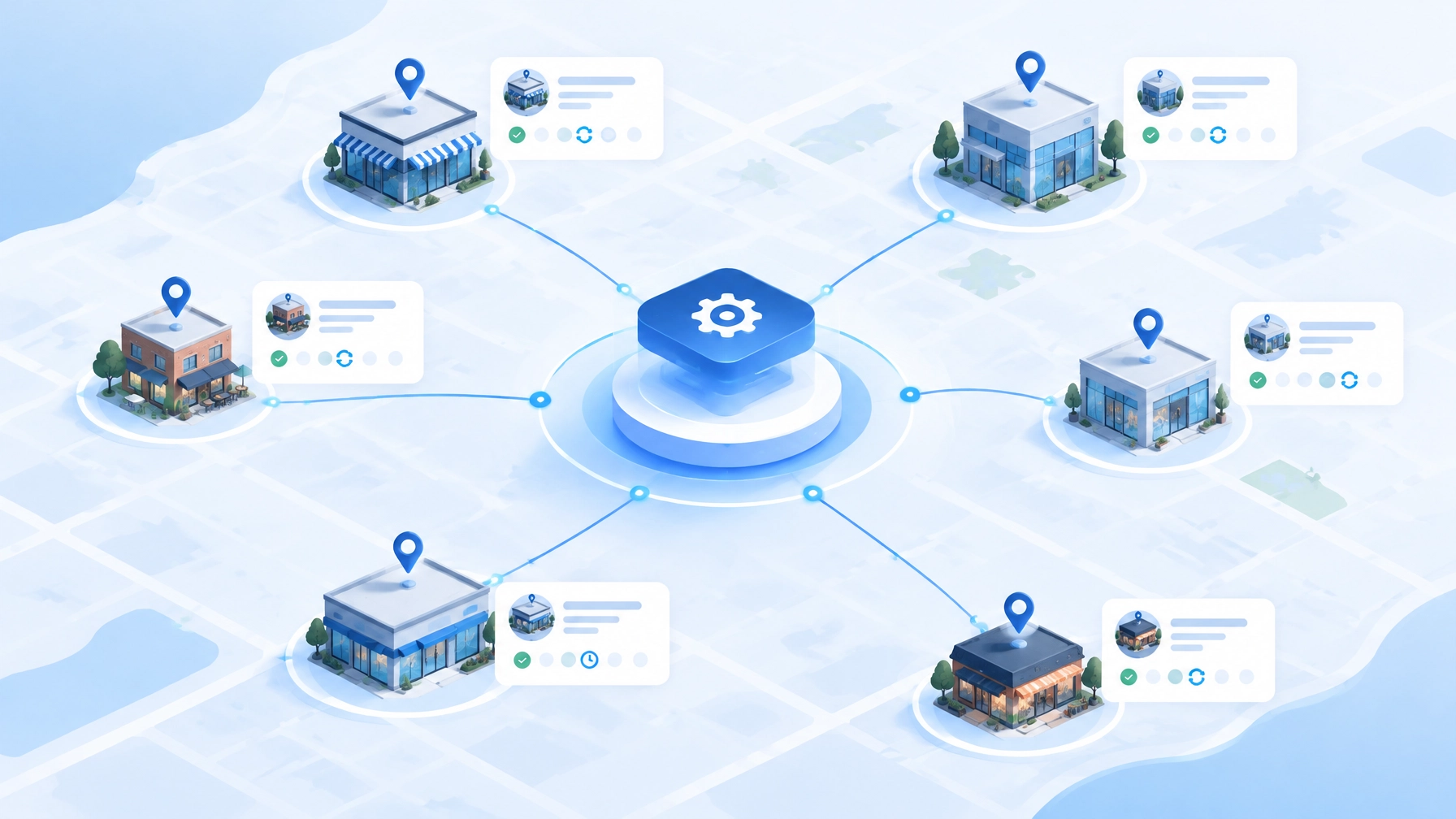
  • Custom Web Application Development: Why the Data Model Decides Whether Your System Scales

    Custom Web Application Development: Why the Data Model Decides Whether Your System Scales

    Amin Said, Founder of Pure Technology Consulting LLC

    When executives evaluate a custom web application, the conversation often begins with visible features: intake forms, dashboards, scheduling, automation, portals, or integrations.

    Those capabilities matter. But the decision that most strongly determines whether the system scales is usually less visible: the data model.

    The data model defines how the application understands the business. It determines how clients relate to locations, how matters or jobs move through workflows, how invoices connect to delivered work, how permissions are enforced, and how leadership eventually measures performance.

    A weak data model can produce a functional point solution. A well-designed model can become the operating system of the business.

    For organizations considering a $10,000+ custom build, this distinction deserves attention during the first weeks of discovery and architecture, not after the application has already accumulated workarounds.

    A custom application should model the business, not just the screen

    Off-the-shelf SaaS is designed to serve a broad market. That can be an advantage when your processes are simple and closely aligned with the product’s assumptions.

    The limitation appears when the business has a more specific operating model.

    A multi-location healthcare group may need to connect patients, locations, providers, episodes of care, referrals, appointments, insurance details, and follow-up tasks. A law firm may need to relate clients, parties, matters, documents, deadlines, time entries, invoices, and responsible attorneys. A field service company may need to connect customers, locations, jobs, work orders, technicians, inventory, service agreements, and billing events.

    If the software cannot represent those relationships naturally, the organization begins adapting its process to the tool. Staff create duplicate records, maintain spreadsheets, add notes to fields that were not designed for the purpose, and move information manually between systems.

    Custom web application development creates a different opportunity: design the system around the real business.

    The key questions become:

    • What are the organization’s core entities?
    • How do those entities relate to one another?
    • Which records are authoritative?
    • What events change the status of a client, matter, job, or invoice?
    • Which decisions require approval?
    • Which information should be visible by location, role, department, or client account?

    The answers form the foundation for every later feature.

    The data model is the operating model expressed in software

    A data model is not simply a database diagram for developers. It is a representation of how the organization works.

    Consider a professional services firm. A basic CRM may store a contact and an opportunity. That is useful, but it may not be enough to support the complete commercial and delivery process.

    A more durable model may distinguish between:

    • A person or organization
    • A prospective client
    • A client account
    • A matter or engagement
    • A practice area or service line
    • A responsible professional
    • A document request
    • A task or deadline
    • A time entry
    • An invoice
    • A payment
    • An interaction or communication event

    Those entities may be related, but they should not be collapsed into one record simply because that is easier to build initially.

    The same principle applies to healthcare and service operations. A patient is not the same as an episode of care. A customer is not the same as a job. A location is not the same as a work order. An invoice is not the same as the service event that produced it.

    When these distinctions are modeled correctly, the application can support more accurate workflows, reporting, permissions, and integrations.

    When they are not, each new requirement becomes more expensive because the system lacks the structure needed to support it.

    Custom operating system architecture showing secure intake, workflow records, integrations, reporting, and billing relationships

    Integrations should be designed as a first-class concern

    Many custom builds begin with the assumption that integrations can be added after the core application is complete.

    That approach often creates avoidable complexity.

    A system that will eventually connect to a CRM, scheduling platform, accounting application, telephony provider, EHR-adjacent system, payment gateway, or document repository should account for those relationships during architecture planning.

    This does not mean every integration must be built in the first release. It means the application should be designed with clear boundaries for external systems.

    A durable integration architecture typically defines:

    • Which system owns each category of data
    • How records are matched across systems
    • Which events trigger synchronization
    • How failures and retries are handled
    • How duplicate records are prevented
    • How credentials and access tokens are secured
    • How external changes are logged
    • Which workflows require human review

    For example, if a scheduling system is responsible for appointment availability while the custom application manages intake and routing, those responsibilities should be explicit. The custom system may create a qualified appointment request, while the scheduling platform remains the authority for available time slots.

    This separation protects data quality and reduces the risk of building business logic around assumptions that change when a vendor updates its API.

    PTC’s proof-of-concept systems demonstrate this architectural pattern in different environments. EHRIO Pro reflects structured intake, matching logic, scheduling considerations, and HIPAA-adjacent workflow controls. FTP Inform demonstrates governed file exchange, validation, workflow orchestration, and auditability. AI Local Boost demonstrates multi-entity automation and integrations across location-based operations.

    These are not presented as products to purchase through this article. They are examples of architecture patterns that can be adapted to a client’s operating environment.

    Permissions and audit trails are part of the core product

    Permissions are often treated as an administrative feature. In a serious business application, they are part of the operating model.

    A multi-location organization may require corporate administrators, regional managers, location operators, finance users, service providers, contractors, and external clients to access the same application with different levels of visibility.

    The system may need to answer:

    • Which users can view a client or account?
    • Who can edit a matter, job, or episode of care?
    • Who can approve an invoice?
    • Which records are limited to a location or department?
    • Which actions require a second reviewer?
    • Can users export sensitive information?
    • What happens when an employee changes roles?

    These controls should be enforced in the application and API layers, not only hidden in the user interface.

    Audit trails are equally important. A governed system should be able to show who changed a status, approved a record, modified a rule, uploaded a document, accessed sensitive information, or overrode an automated recommendation.

    An audit event commonly includes:

    • The user or system actor
    • The action performed
    • The affected record
    • The date and time
    • The previous and new values
    • The source or workflow that initiated the change
    • Relevant metadata or reason codes

    For legal, accounting, healthcare, financial, and operationally complex organizations, this record supports accountability, troubleshooting, compliance reviews, and better management decisions.

    Reporting should be designed as a product feature

    Dashboards are often added at the end of a project after the transactional workflows have been built.

    That usually produces activity summaries rather than decision-quality reporting.

    If leadership needs to understand utilization, revenue leakage, cycle time, conversion, workload, exception volume, or location performance, those requirements should influence the data model from the start.

    A useful reporting design begins with the decisions leaders need to make:

    • Which locations are generating demand but failing to convert?
    • Where are intake or onboarding processes delayed?
    • Which jobs remain open beyond the expected service window?
    • How long does it take to move from approval to delivery?
    • Which invoices require correction or repeated follow-up?
    • How much work is completed without manual intervention?
    • Where are exceptions accumulating?

    The application should capture the events and relationships required to answer those questions. That may include status histories, timestamps, ownership changes, workflow stages, location identifiers, service categories, and financial relationships.

    Reporting is not merely a visual layer over a database. It is a product capability that turns operational activity into management visibility.

    Digital transformation roadmap from workflow discovery and architecture through integration, reporting, and scalable operations

    Multi-year extensibility must be designed from day one

    A scalable system does not attempt to predict every future feature. It creates enough structure to support responsible change.

    That means separating business rules from interface components, using consistent identifiers, maintaining clear ownership of data, and designing workflows that can accommodate new statuses, roles, locations, service lines, and integrations.

    It also means avoiding unnecessary hard-coding.

    For example, if a client operates in one location today but expects to expand, the data model should not assume a single location. If a firm currently supports one service line but may add others, the application should not bury service-specific logic throughout the codebase. If a workflow may require approval in the future, the architecture should allow for review states and delegated responsibility.

    The goal is not to over-engineer the first release. The goal is to prevent short-term decisions from blocking reasonable growth.

    A practical roadmap may include:

    1. Workflow discovery: Map current processes, systems, entities, handoffs, and exceptions.
    2. Domain modeling: Define the relationships among clients, locations, matters, jobs, work orders, invoices, users, and events.
    3. Architecture planning: Establish application boundaries, integration responsibilities, security controls, and reporting needs.
    4. Focused pilot: Build one high-value workflow with representative users and real operational scenarios.
    5. Measurement: Compare cycle time, manual touches, errors, and exception volume against the current baseline.
    6. Scale-out: Extend the architecture into adjacent workflows, locations, departments, or service lines.

    This approach gives executives a clearer connection between the build investment and the operating outcomes it is intended to support.

    When custom development becomes the strategic choice

    Custom web application development is not automatically better than SaaS. Standard software remains appropriate when the workflow is common, stable, and well served by the product.

    A custom build becomes more compelling when the organization needs to:

    • Coordinate multiple systems that do not integrate effectively
    • Support multiple locations, entities, or service lines
    • Preserve proprietary workflows and approval rules
    • Create a client, patient, partner, or operator experience specific to the business
    • Establish granular permissions and auditability
    • Build reporting around its own economic and operational model
    • Automate work without removing professional judgment
    • Extend the system over several years as the organization changes

    The question is not whether a custom application has more features. The question is whether it represents the business more accurately and creates a stronger foundation for future growth.

    Build the system your organization is becoming

    The most important architecture decision is made before the first screen is designed.

    If the application begins with a clear understanding of the business entities, relationships, ownership rules, workflow events, integrations, permissions, and reporting requirements, it can grow from a point solution into a durable operating platform.

    If those decisions are postponed, the organization may spend the next several years compensating for a system that never fully understood how the business works.

    Pure Technology Consulting helps growth-focused organizations plan and build custom web applications, enterprise automation systems, integrations, and reporting environments around their actual operating models. To discuss a custom build or request a workflow audit, book a discovery call or visit https://puretechconsult.com. You can also review our custom web development services.

    Contact: +1 (803) 921-0969

    Amin Said, Founder of Pure Technology Consulting LLC
    https://puretechconsult.com